
Job Search Copilot
Land your next interview on autopilot
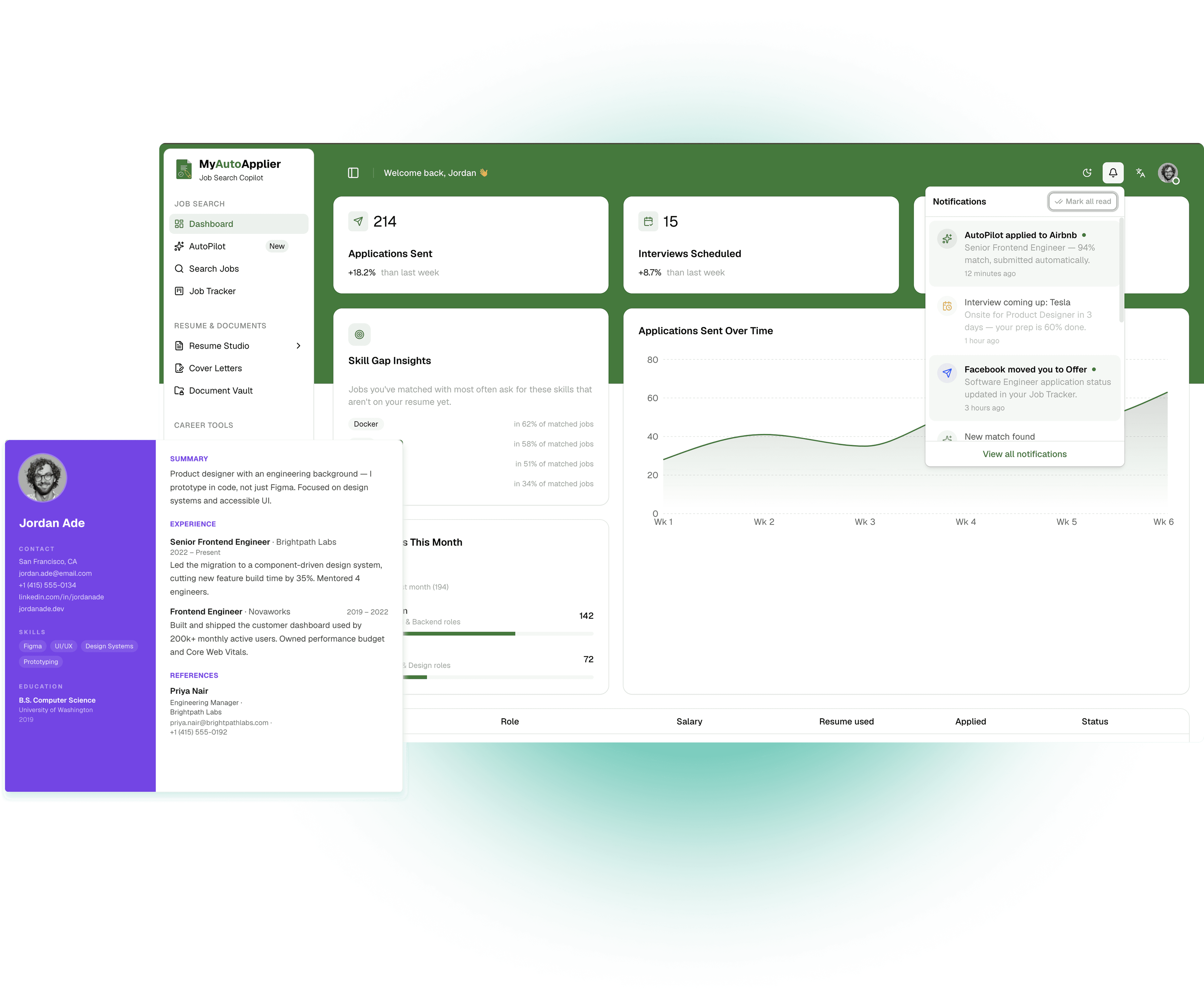
AutoPilot searches, tailors, and submits job applications for you — within the match score and daily limits you set. Search manually when you want to, automate the rest when you don't.
Free plan included — no credit card required.



Senior Product Designer
Airbnb · $150K – $190K

Data Engineer
Netflix · $160K – $210K

Software Engineer
Google · $150K – $200K

Program Manager
Microsoft · $120K – $155K

Backend Engineer
Uber · $145K – $185K

Customer Success Manager
Slack · $95K – $120K

Developer Advocate
GitHub · $130K – $165K

Frontend Engineer
Dropbox · $140K – $175K

Marketing Manager
Spotify · $110K – $140K

Product Designer
Figma · $135K – $170K

Community Manager
Discord · $85K – $110K

Mechanical Engineer
Tesla · $105K – $135K

Product Marketing Manager
Asana · $115K – $145K
Senior Product Designer
Airbnb · $150K – $190K
Data Engineer
Netflix · $160K – $210K
Software Engineer
Google · $150K – $200K
Program Manager
Microsoft · $120K – $155K
Backend Engineer
Uber · $145K – $185K
Customer Success Manager
Slack · $95K – $120K
Developer Advocate
GitHub · $130K – $165K
Frontend Engineer
Dropbox · $140K – $175K
Marketing Manager
Spotify · $110K – $140K
Product Designer
Figma · $135K – $170K
Community Manager
Discord · $85K – $110K
Mechanical Engineer
Tesla · $105K – $135K
Product Marketing Manager
Asana · $115K – $145K
How it works
One profile powers every resume, cover letter, and application from then on.
- 1
Build your profile once
A guided 7-step onboarding captures your background, preferences, and experience — or paste in an existing resume and let AI autofill all seven steps at once.
- 2
Choose your mode
Turn on AutoPilot and let it search, score, tailor, and submit applications within your limits, or search manually and apply yourself. Mix both any time.
- 3
Track every application
Every application — AutoPilot or manual — lands in the Job Tracker, moving through Saved, Applied, Interviewing, and Offer or Rejected.
- 4
Prep for what's next
Scheduled interviews surface automatically in Interview Prep with practice questions and AI feedback. Skill Gap Analysis and the Career Coach are there whenever you need them.
Everything your job search needs, in one place
No more juggling five tabs and a spreadsheet.
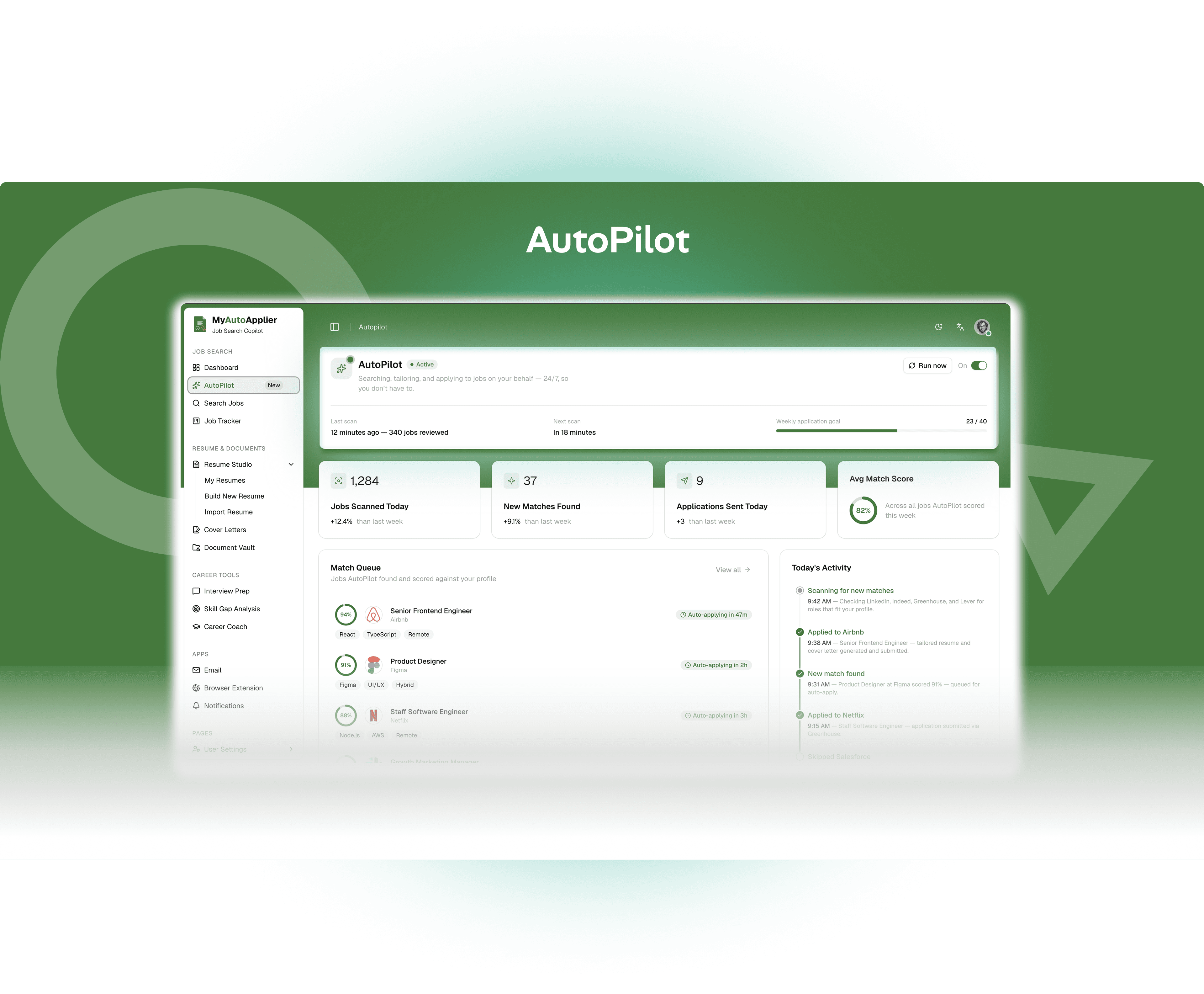
AutoPilot
It doesn't just find jobs — it applies to them
AutoPilot scores how well a listing matches your profile, tailors a resume and cover letter to it, and submits the application — within the match threshold and daily cap you set. Watch the live match queue and activity feed as it works.
Job Tracker
Every application, one board
AutoPilot-sourced and manually-added applications land in the same kanban tracker — Saved, Applied, Interviewing, Offer, Rejected — with response-rate stats so you always know where you stand.

Build a resume that gets you noticed
Live-preview editor, four templates, and an import flow that turns an existing resume into a fully structured, editable one.
Try it now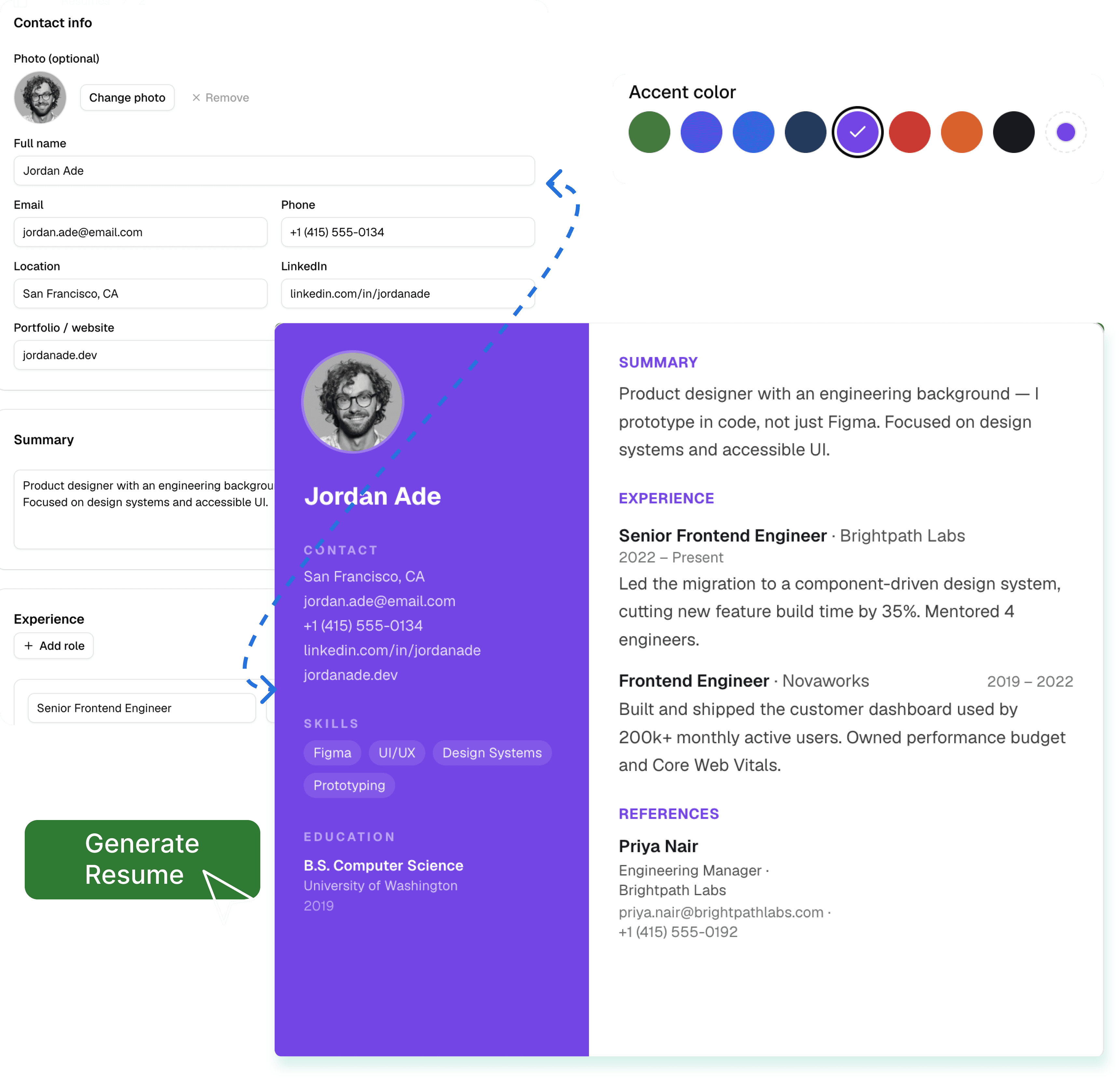
See exactly what's missing from your resume
Get a match score against any target role, plus the specific in-demand skills to add and where to learn them.
Try it now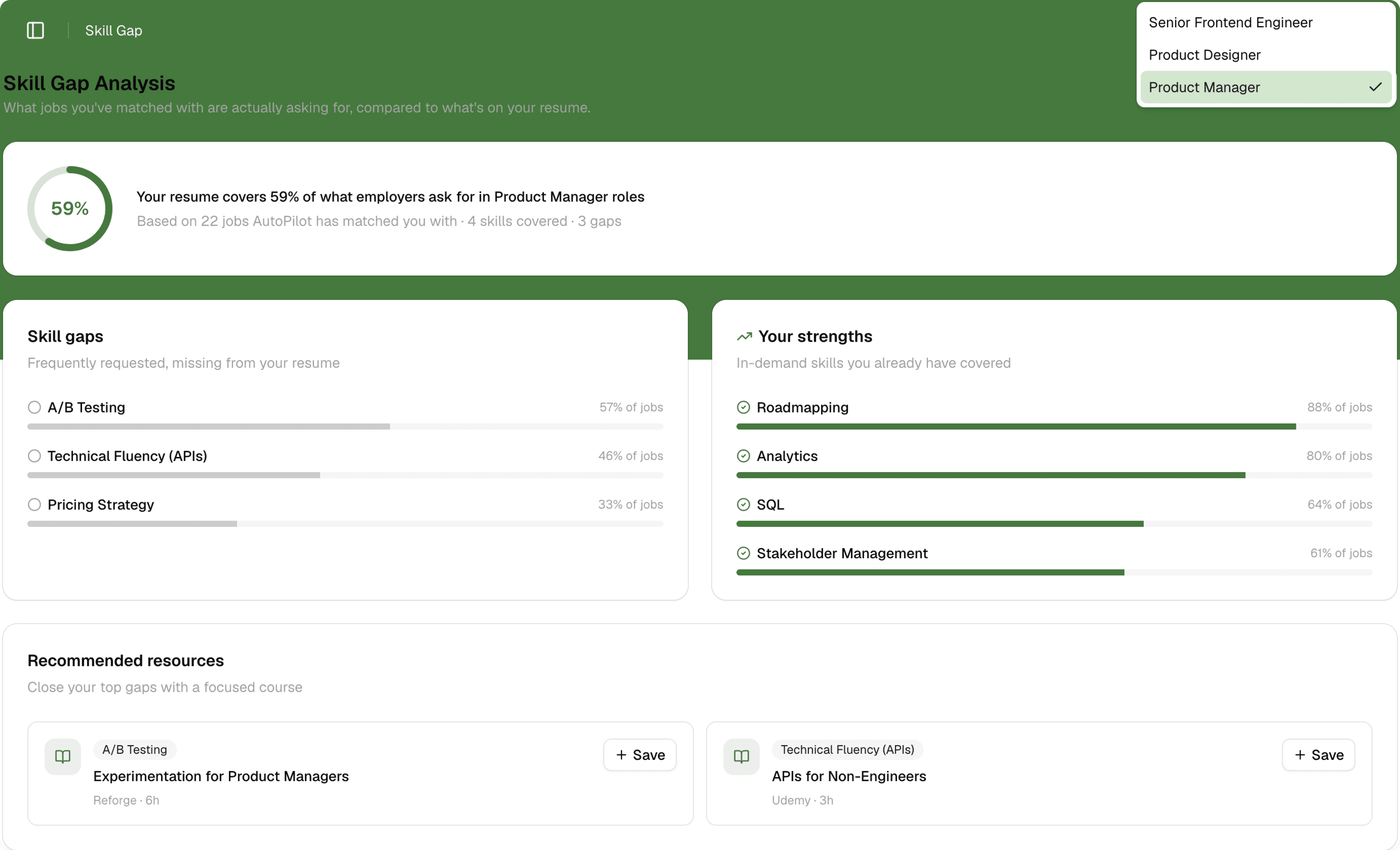
Walk into interviews already prepared
Practice behavioral, technical, and role-specific questions and get AI-scored feedback on every answer.
Try it now
Mock interview
Practicing behavioral questions
Tell me about a time you had to resolve a conflict with a teammate.
Strengths
Areas to improve
Auto-fill applications as you browse
The companion browser extension auto-fills application forms right on the job board — with per-site toggles for LinkedIn, Indeed, Greenhouse, Lever, and Wellfound.
Try it nowAuto-fill enabled on
 LinkedIn
 Indeed
 Greenhouse
 Lever
Lever Wellfound
Recent activity
You’re in control, not AutoPilot
AI applies on your behalf, but only within the rules you set — nothing gets submitted without your guardrails.
Auto-apply or review first
Choose whether AutoPilot submits applications on its own, or queues them up for your approval before anything is sent.
You set the match threshold
Only listings that meet the minimum match score you choose get tailored and applied to.
You set the daily cap
Cap how many applications AutoPilot can send per day — or leave it unlimited. Nothing runs away from you.
Full visibility, always
Inspect the match queue and activity log any time to see exactly what AutoPilot found, scored, and did.
Simple pricing, no trial required
Every signup starts on Free — full manual features, capped AutoPilot usage. Upgrade whenever you’re ready.
Free
Get started with the basics
- 5 AutoPilot applications/month
- 1 resume
- Manual search & tracker
- Community support
Pro
For active job seekers
or $23/mo billed annually
- Unlimited AutoPilot applications
- Unlimited resumes & cover letters
- Full Career Tools suite
- Browser Extension
- Priority email support
Premium
For a faster offer
or $47/mo billed annually
- Everything in Pro
- Monthly 1:1 career coach session
- Expert resume review
- Priority application queue
- Early access to new features
Frequently asked questions
- Can I cancel anytime?
- Yes, from Billing & Usage. You keep your plan's features until the paid period ends.
- Does AutoPilot really apply on my behalf?
- Yes, on Pro and Premium — it scans, scores, tailors, and submits applications within the limits and thresholds you set.
- Is MyAutoApplier safe to use?
- Yes. AutoPilot only acts within the rules you set — you choose auto-apply or review-first, set the match threshold and daily cap, and can inspect the match queue and activity log at any time to see exactly what it found, scored, and did.
- What happens to my data if I downgrade?
- Nothing is deleted. You're just limited to 5 AutoPilot applications a month and one active resume.
- Is there a free trial for Pro?
- No separate trial — Free gives you full access to the core manual features, so you can try before you upgrade.
- How many jobs should I apply to per day?
- There's no universal number — fit matters more than volume. AutoPilot lets you set your own daily cap (or leave it unlimited) and only applies to listings above the match score you choose, so you control the pace.
- Does it auto-fill applications on Greenhouse and Lever?
- Yes. The browser extension auto-fills application forms as you browse, with per-site toggles for LinkedIn, Indeed, Greenhouse, Lever, and Wellfound.
- How do I optimize my resume for ATS screening?
- AutoPilot tailors your resume to each listing's language and requirements before it's submitted, and you can review or edit any tailored version yourself for a specific application.
- How do I track multiple job applications in one place?
- Every application — AutoPilot-sourced or manually added — lands in the Job Tracker, a kanban board moving through Saved, Applied, Interviewing, Offer, and Rejected, with response-rate stats.
- Can I practice interview questions with AI?
- Yes — scheduled interviews surface automatically in Interview Prep with practice questions and AI feedback, so you can get ready for what's next.

Your applications, working while you’re away
Set your match score, set your daily cap, and let AutoPilot take it from there.
Get started free